

What this article helps you decide
Whether packet capture is the right evidence source for a specific network question, what must be agreed before collection, and how to turn the result into an accountable next action without overclaiming what it proves.
Wireshark makes network packets inspectable. It does not decide what they mean for your organization.
The tool supports live capture, analysis of saved capture files, and detailed inspection of supported protocols. Those capabilities can help with troubleshooting and authorized investigation. They do not remove the need to define scope, protect the collected information, and interpret observations in context. [1] [2]
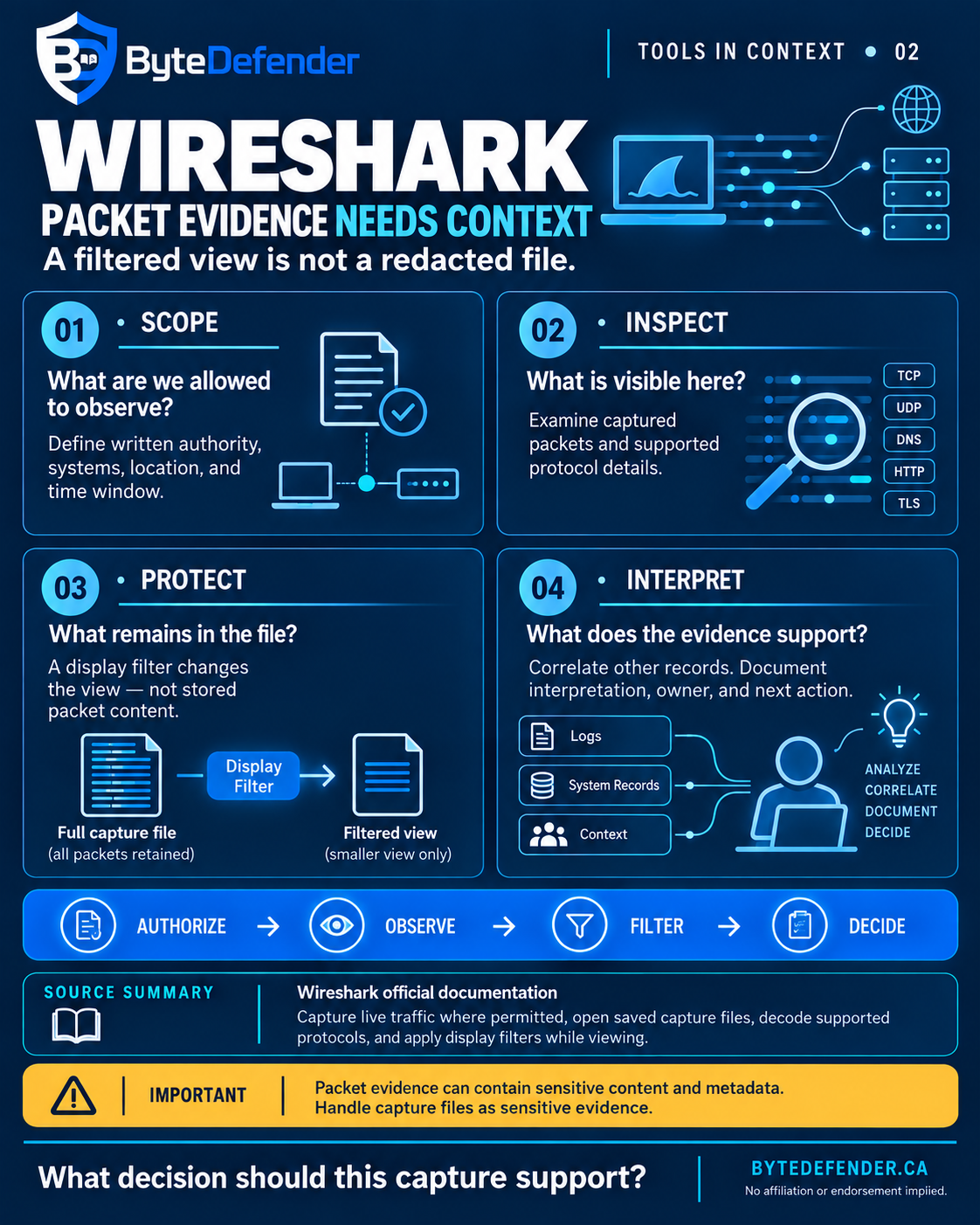
The four questions below follow the accompanying infographic: Scope → Inspect → Protect → Interpret. This is ByteDefender’s practical application of documented capabilities and limitations—not an official Wireshark methodology or a configuration tutorial.
1. Scope: What are we allowed to observe?
Before opening a capture session, define the decision the evidence is expected to support.
“Investigate the network” is too broad to guide a bounded exercise. A more useful question might be: “What can we observe about an approved application session during the period when a timeout is reported?”
That question provides a starting point for agreeing the relevant systems, observation location, time window, and people responsible for the work. It also gives the team a reason to stop: enough evidence to support the next decision, or a documented finding that the chosen observation point cannot answer the question.
Wireshark’s capture prerequisites identify three practical dependencies: sufficient capture privileges, the correct network interface, and a position in the network from which the relevant traffic can be seen. Possessing the software does not establish visibility into every communication path. [3]
Technical access and organizational authorization are separate decisions. In ByteDefender’s operating approach, collection should proceed only within written authorization, defined scope, and an approved evidence-handling process.
Before collection, document who authorized the work, what is in and out of scope, who may inspect the results, and how the file will be stored, shared, retained, and deleted. These are proposed operating controls, not a statement that one permission or retention rule applies in every jurisdiction.
Practical test: Can the team explain why this observation point is suitable—and what it cannot see?
2. Inspect: What is visible here?
Wireshark can present captured packet data, decoded protocol information, filtered views, and statistics. The official guide identifies uses including network troubleshooting, examination of security problems, and debugging protocol implementations. [2]
The important word is captured. An observation belongs to the interface, location, collection period, and capture conditions that produced it. A sensible interpretation stays inside those boundaries.
For example, “No response is visible in this capture” is a narrower conclusion than “The service did not respond.” The latter may require additional evidence that the observation point could see the relevant exchange. That is an interpretation discipline derived from the capture-position limits—not a diagnosis supplied automatically by Wireshark. [3]
Protocol decoding also should not be confused with automatic access to encrypted application content. Wireshark supports TLS decryption under appropriate conditions, including the availability of suitable secrets. Simply opening an encrypted capture does not make its protected content readable. This article does not provide decryption instructions. [4]
ByteDefender’s recommendation is to record an observation separately from its interpretation. State what the capture shows, what remains uncertain, and what other evidence is needed before a decision can be justified.
Practical test: Are you describing something observed, or an explanation that still needs validation?
3. Protect: What remains in the file?
A filtered view is not a redacted capture file.
Wireshark’s documentation explicitly states that display filtering changes which packets are shown while leaving the capture-file contents unchanged. Packets hidden from the analyst’s current view remain in the file. [5]
That distinction matters when evidence leaves the analyst’s workstation. A recipient of the original capture does not receive only the packets currently visible on the sender’s screen. Applying a display filter is therefore not a data-removal or sharing-approval step. [5]
Three different operations
| Operation | What it changes | Boundary to remember |
|---|---|---|
| Capture filter | Limits collection to packets matching the capture filter. | It is a collection choice, not a guarantee that everything captured is safe to share. |
| Display filter | Changes which packets are shown during analysis. | It does not remove hidden packets from the stored capture. |
| Export specified packets | Saves selected packets into a separate output. | Selecting fewer packets does not establish that the remaining content is free of sensitive information. |
The collection, display, and export behaviours above are documented by Wireshark. The sharing cautions are ByteDefender’s practical interpretation of those distinct operations. [5] [6] [7]
Wireshark’s own file-sharing guidance recognizes that capture files can contain sensitive information and distinguishes private handling from public distribution. A file should not be treated as harmless simply because it was created for troubleshooting. [8]
As an operating practice, review the actual material proposed for sharing, limit recipients to the approved purpose, use an approved transfer route, and apply the organization’s retention and deletion decisions. A screenshot or exported subset also needs its own review; neither should inherit a “safe to share” label from the analyst’s intent.
Where a working subset is prepared, document its relationship to the original and preserve the original when the approved evidence process requires it. Do not mistake a simplified analyst view for the underlying evidence record.
Practical test: Has the actual file been reviewed for the intended recipient and purpose—not just the visible packet list?
4. Interpret: What does the evidence support?
A useful analysis ends with a decision record, not merely a capture attachment.
ByteDefender’s proposed review separates three things: the observation, the explanation being considered, and the action that the available evidence supports. Correlate packet observations with relevant application, system, identity, or operational records, rather than treating one view as the whole event.
The person interpreting the capture should make uncertainty visible. An explanation can be plausible without being established. The next action may be a configuration review, further evidence collection within an approved scope, or escalation to a different system owner. It need not be an immediate declaration of root cause.
Wireshark can contribute to diagnosis. The boundary is not that packet analysis can never establish a cause; it is that a packet view does not automatically establish cause or intent. The official guide also distinguishes Wireshark from an intrusion-detection system. [2]
A compact handoff can make that boundary explicit:
| Record | Question it answers |
|---|---|
| Decision and scope | What question did the work address, and under whose authority? |
| Observation and coverage | What was visible, where, and during which period? |
| Interpretation and uncertainty | What explanation is supported, and what remains unverified? |
| Corroborating evidence | Which other records support or challenge that explanation? |
| Owner and next action | Who will act, and what will they do? |
| Review and handling | How will the action be checked, and what happens to the evidence? |
This is a suggested ByteDefender handoff record, not a built-in Wireshark report or a formal assurance standard.
Practical test: Could another responsible person understand both the conclusion and its limits?
An illustrative example: an application session times out
Hypothetical scenario—not a customer incident, laboratory result, or claim about work performed by ByteDefender.
A team receives a report that an application session is timing out. Rather than beginning with unrestricted collection, it defines an approved test session, a relevant observation point, and a limited collection window.
During review, the analyst narrows the display to the exchange of interest. That makes the packet view easier to inspect; it does not remove unrelated captured packets from the source file. [5]
The analyst then compares the visible exchange with the application’s records. In this scenario, the team does not yet have enough evidence to distinguish between the explanations under consideration. The appropriate output is a documented observation, the remaining uncertainty, and an owned next step—not “Wireshark proved the network caused the timeout.”
Before any evidence is sent to a support provider, the team reviews the material intended for that recipient and follows the approved sharing process.
The point of the example is not a particular technical diagnosis. It is the decision sequence: collect for a reason, inspect within scope, protect the evidence, and act only on the conclusion it supports.
Where Wireshark fits—and where it is insufficient
Wireshark is useful when a team needs detailed packet-level evidence for a defined troubleshooting or investigative question. It is insufficient on its own when the decision requires evidence outside the capture, an automatically established malicious intent, or assurance about an entire environment. That is a boundary on the conclusion, not a dismissal of the tool. [2] [3]
Keep four limits visible: the capture does not establish complete network visibility; a filtered view is not a sanitized file; encrypted content is not automatically readable; and interpretation still requires an accountable reviewer. [3] [4] [5]
Do not turn those limits into a reason to collect everything. Use them to decide whether packet capture is appropriate, whether a different observation point is needed within the authorized scope, or whether another evidence source should lead the investigation.
Start with one decision, not more data
Before the next capture, write down the question, the approved observation point, the evidence-handling conditions, and the person responsible for the next action.
Then ask the fit-check question from the infographic:
What decision should this capture support?
The value is not simply a file containing packets. It is a scoped, protected evidence record that helps someone make a better-supported decision.
Explore ByteDefender’s network-security approach
Start with the systems, scope, and evidence your organization needs. Explore ByteDefender’s network-security approach.
Primary references
- Wireshark, About Wireshark — Features.
- Wireshark User’s Guide, Chapter 1: Introduction, especially intended purposes, features, and “What Wireshark is not.”
- Wireshark User’s Guide, 4.2: Capture Prerequisites.
- Wireshark Wiki, TLS, conditional decryption support only; no procedure is reproduced.
- Wireshark User’s Guide, 6.3: Filtering Packets While Viewing.
- Wireshark User’s Guide, 4.10: Filtering While Capturing.
- Wireshark User’s Guide, 5.7.1: Export Specified Packets.
- Wireshark Wiki, Sending Files to Wireshark — Capture Files.
Source documentation checked 14 September 2026. This is educational guidance, not a capture tutorial or a legal or compliance opinion. The four-question workflow, handoff record, and hypothetical scenario are ByteDefender’s application framing. Wireshark and associated marks belong to their respective owners; inclusion does not imply affiliation, sponsorship, or endorsement. No independent product test or customer outcome is claimed.