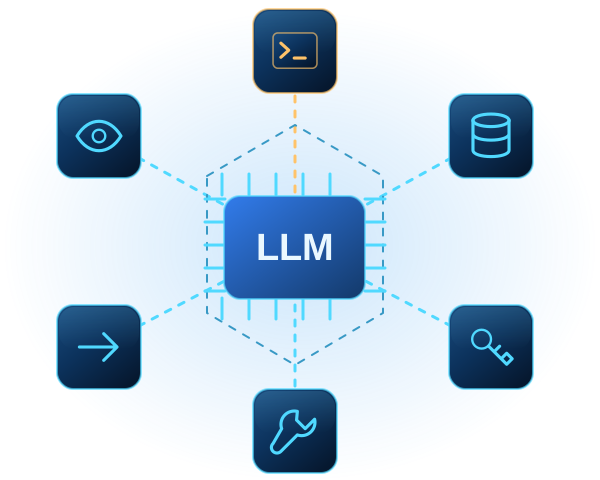
What can this AI feature read, call, change or disclose?
Adding a large language model changes how instructions, data, identities and system capabilities interact.
A model may receive a prompt, retrieve internal documents, combine them with system instructions, call an API and send output into another workflow. Each handoff raises a decision: what is trusted, whose identity authorizes access, and what must be independently checked. That does not make every LLM feature unsafe; it means the review should cover the complete feature—not only the model or chatbot screen.
Why the surrounding architecture determines impact
Prompts are only one input. Retrieved documents, webpages, files, images, tool responses and earlier agent messages may also enter the model’s context.
The OWASP GenAI Security Project’s prompt-injection guidance distinguishes direct injection through a user prompt from indirect injection in external content. It also notes that impact depends on business context and the agency designed into the application. An unexpected response in an isolated drafting assistant is different from one in a system that can retrieve confidential records, send messages or modify data.
Two related OWASP risk areas help explain why:
- Improper Output Handling concerns model output passed to downstream components without appropriate validation, sanitization or context-specific encoding.
- Excessive Agency focuses on excessive functionality, permissions or autonomy that can allow unexpected or manipulated output to produce consequential actions.
Filters and system instructions can contribute to defence, but they should not carry the full burden. Restricting capabilities, enforcing authorization outside the model and validating transitions can reduce the impact of unexpected behaviour.
A six-boundary map for one LLM feature
The following is a ByteDefender practical synthesis informed by OWASP guidance and the NIST Generative AI Profile. It is not an official OWASP or NIST framework.
1. Untrusted inputs
Prompts, files, web content, retrieval and agent messages
2. Instructions & context
System instructions, memory, retrieved data and conversation state
4. Tools & actions
Functions, APIs, permissions and state changes
3. Identity & data
Users, tenants, service identities and sensitive records
5. Output & consumers
Browsers, databases, email, workflows and other systems
1. Untrusted inputs
List every source that can influence behaviour: prompts, files, retrieved records, websites, emails, images, tool results and agent messages. Record who controls each source and whether it can change after approval or indexing. Keep external content distinct where possible, and test ordinary and manipulated inputs.
2. Instructions and model context
Map system and developer instructions, history, memory, retrieval results and other context. Identify data that should never enter it. Do not treat a written instruction as authorization; enforce access and permitted actions through deterministic application and downstream-system logic.
3. Identity and data access
Record whose identity is used for each retrieval and action, and which tenants, repositories and record types it can access. Preserve the user’s authorization scope for actions performed on their behalf. Avoid a broadly privileged shared identity when narrower access is sufficient.
4. Tools and downstream actions
For every tool or API, document its purpose, parameters, permissions and ability to alter state. Prefer narrow operations such as “read approved product records” over arbitrary URL fetching or command execution. Require independent authorization at the destination; the model should not approve its own request.
5. Output and consuming systems
Treat generated output as untrusted when another component will render, parse, execute or act on it. Define an expected schema and validate or encode for the destination. Browsers, databases, workflows and email templates require different handling. Separate explanatory text from machine-actionable fields.
6. Approval, monitoring and recovery
Identify actions requiring human approval, such as sending external messages, changing access, moving money or deleting records. Show the real action and relevant context to the reviewer.
Log tool requests, authorization outcomes, approvals and errors while minimizing sensitive content. Define alerts, limits, rollback options, an incident owner and conditions for disabling the feature.
| Boundary | Map | Release question | Leading controls |
|---|---|---|---|
| Inputs | Prompts, files, retrieval and agent messages | Who controls each source? | Separation, labelling and adversarial tests |
| Context | Instructions, memory and conversation state | What may influence behaviour? | Context minimization and deterministic policy |
| Identity & data | Users, tenants, service identities and records | Whose authority is being exercised? | User-scoped identity and least privilege |
| Tools & actions | Functions, APIs and state changes | What can the feature cause another system to do? | Narrow tools and downstream authorization |
| Output | Browser, database, email and workflow consumers | How will another component interpret it? | Schemas, validation and context-aware encoding |
| Operations | Approval, logs, alerts, rollback and response | Can the organization detect, stop and recover? | Risk-based approval and response plans |
Pre-launch review checklist
Before release, confirm:
- Is the intended use and expected user population documented?
- Are all direct and indirect input sources identified?
- Is untrusted external content separated from trusted instructions?
- Is sensitive data entering and leaving model context documented?
- Are retrieval operations constrained by the requesting user’s authorization?
- Is every enabled tool necessary for the intended feature?
- Are tool permissions narrower than the maximum permissions available?
- Does the destination independently authorize every requested action?
- Is model output validated for the exact downstream context?
- Do consequential actions require meaningful approval?
- Are monitoring, escalation, rollback and deactivation procedures ready?
- Has the complete workflow undergone adversarial testing in realistic conditions?
Support each “yes” with architecture, configuration or test evidence.
Use the map as a release decision tool
The NIST AI RMF Generative AI Profile is voluntary guidance. Its suggested actions include inventorying generative-AI systems, documenting context and limitations, threat modelling, adversarial testing, human oversight, monitoring and incident response.
The map shows where safeguards belong, who owns them and what evidence release requires.
It may also reveal a simpler design. Removing an unnecessary tool, switching an integration to read-only access or adding approval before a state-changing action can reduce exposure without trying to make the model perfectly predictable. If this work begins during design, a structured Security Architecture review can help turn the map into enforceable identities, permissions and validation boundaries.
Review the complete AI feature—not only the model
ByteDefender can help your team map the architecture, test realistic abuse paths and prioritize controls around an LLM-enabled application.
Explore AI SecurityPrimary sources
- OWASP GenAI Security Project, LLM01:2025 Prompt Injection.
- OWASP GenAI Security Project, LLM05:2025 Improper Output Handling.
- OWASP GenAI Security Project, LLM06:2025 Excessive Agency.
- National Institute of Standards and Technology, Artificial Intelligence Risk Management Framework: Generative Artificial Intelligence Profile, NIST AI 600-1, July 2024.
Sources reviewed August 12, 2026. The map is ByteDefender’s practical synthesis.